The Whimsical World of Paper Cut: A Display Font for Creative Projects
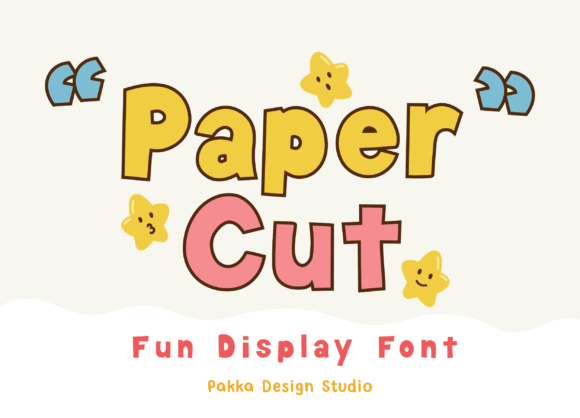
If you've ever spent an afternoon with scissors, glue, and a pile of colorful paper, you know the feeling. It's that hands-on, slightly imperfect, and utterly charming aesthetic of something made by hand. The Paper Cut display font captures that exact spirit in every letterform. This isn't just another typeface; it's a collection of playful, crafted pieces designed to bring a sense of whimsy and authenticity to your work. Think of it as a digital craft kit for your typography.
Visually, Paper Cut is characterized by its clean, slightly irregular edges that mimic the look of scissors slicing through cardstock. The letterforms have a subtle, tactile quality, as if each character were individually cut and arranged. It avoids the overly polished look of many modern fonts, embracing instead a friendly, approachable, and slightly retro vibe. The personality of this creative font is joyful, energetic, and nostalgic, making it an instant mood-lifter for any design. It’s a premium font that feels personal and handmade, bridging the gap between professional design and the warmth of a DIY project.
Where Paper Cut Truly Shines: Practical Applications
Understanding a font's personality is one thing, but knowing where to deploy it is where the real value lies for designers and business owners. Paper Cut excels in contexts where you want to evoke creativity, playfulness, and a hands-on approach. It’s a versatile tool, but its strength is in specific, impactful applications.
Branding and Logo Design
For brands targeting families, educators, crafters, or the DIY market, Paper Cut can become the cornerstone of a memorable brand identity. Imagine a children's book author's logo, a boutique stationery shop's branding, or the masthead for a crafting blog. This display font instantly communicates a brand's core values of creativity and approachability. It works exceptionally well for logo design where the name is the primary mark, allowing the unique character shapes to tell the story. Pair it with a simple, clean sans serif font for body text to maintain professionalism and readability.
Packaging and Editorial Design
On a shelf, Paper Cut can make a product pop. It’s ideal for packaging design for craft supplies, kids' toys, organic snacks, or artisanal goods. The font adds a layer of perceived care and creativity to the product itself. In editorial design, consider it for chapter headings in a lifestyle magazine, pull quotes in a blog post, or the title of a scrapbook-style photo book. It guides the reader's eye with a burst of energy without overwhelming the page.
Digital and Social Media Presence
In the fast-scrolling world of social media, grabbing attention is paramount. Paper Cut is a fantastic choice for social media graphics, Instagram story headlines, YouTube video titles, and Pinterest pins. Its distinctive look stops the scroll. For web design, use it sparingly but effectively for key headlines, call-to-action buttons, or promotional banners to inject personality. It translates well to screen, maintaining its charm without sacrificing clarity at reasonable sizes.
Making It Work: Guidance for Designers and Creators
Choosing the right typeface is a strategic decision. Here’s how to evaluate and implement Paper Cut effectively in your projects.
Evaluating Project Fit: Ask yourself: Does my project require a serious, authoritative tone? If yes, a serif font or a neutral sans serif might be better. Paper Cut is for projects that embrace fun, imagination, and a personal touch. It’s perfect for a birthday party invitation, a recipe card, or a workshop flyer, but less suited for a corporate financial report.
Testing Font Pairings: The key to using a strong display font like Paper Cut is balance. Avoid pairing it with another ornate or handwritten font, which can create visual chaos. The classic and reliable approach is to pair it with a highly legible, neutral font pairing partner. A clean sans serif like Helvetica, Open Sans, or Lato for body copy provides a calm foundation that lets Paper Cut's headlines sing. For a slightly warmer feel, a simple, readable script font for subheadings can work, but test it carefully.
Considering Readability and Hierarchy: As a display font, Paper Cut is designed for impact at larger sizes—think headlines, titles, and short phrases. It is not intended for long paragraphs of body text, where readability is crucial. Use it to establish the top level of your visual hierarchy, then step down to your chosen body font. This creates a clear, engaging structure for the reader.
Checking the Fine Print: Before using any commercial font, always review the licensing. Paper Cut, as a premium font, typically comes with a license that outlines permitted uses—whether for a single project, multiple clients, or across digital and print mediums. Ensure your intended use, especially for commercial products or client work, is covered by the license you purchase. This is a non-negotiable step for professional and legal compliance.
In the end, Paper Cut is more than just letters on a screen. It’s a design asset that carries a mood. It’s the digital equivalent of that perfectly imperfect paper craft project you were proud of as a kid. Used thoughtfully, it can transform a standard design into something that feels genuinely crafted, engaging, and full of personality. It reminds us that in a world of sleek modern typography, there’s always room for a little bit of joyful, handmade charm.